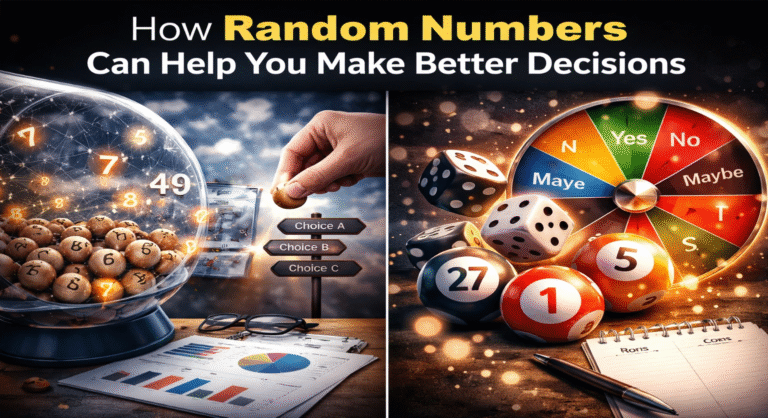
You have probably seen them at carnivals, on game shows, or in classrooms. A large colorful wheel spins around and around until it lands on a prize or a consequence. There is something universally exciting about watching a wheel turn, not knowing where it will stop. That sense of anticipation, the moment of suspense, the reveal of the result. It never gets old.
Today, you do not need a physical wheel to enjoy this experience. Virtual wheel games bring all the fun of spinning directly to your screen. Whether you want to make decisions, play games with friends, or just enjoy the thrill of chance, a spin wheel online is the perfect tool. This comprehensive guide will explore everything you need to know about virtual wheel games. You will learn how they work, how to use them for different purposes, and how to make the most of your spinning experience.
Discover How Rich You Are!
Use our fun virtual calculator to see your “wealth score” instantly.
Check Your Wealth Now →What Is a Virtual Wheel Game?
A virtual wheel game is a digital version of the classic spinning wheel. It consists of a circle divided into segments, each containing a prize, option, or outcome. When you click to spin, the wheel rotates and eventually stops, pointing to one of the segments. The result is random, adding an element of chance and excitement.
Virtual wheels are incredibly versatile. You can use them for party games, classroom activities, decision making, prize giveaways, and even personal challenges. The best part is that you can customize the wheel to suit your needs. You can change the prizes, adjust the colors, control the spin speed, and even add sound effects for extra excitement.
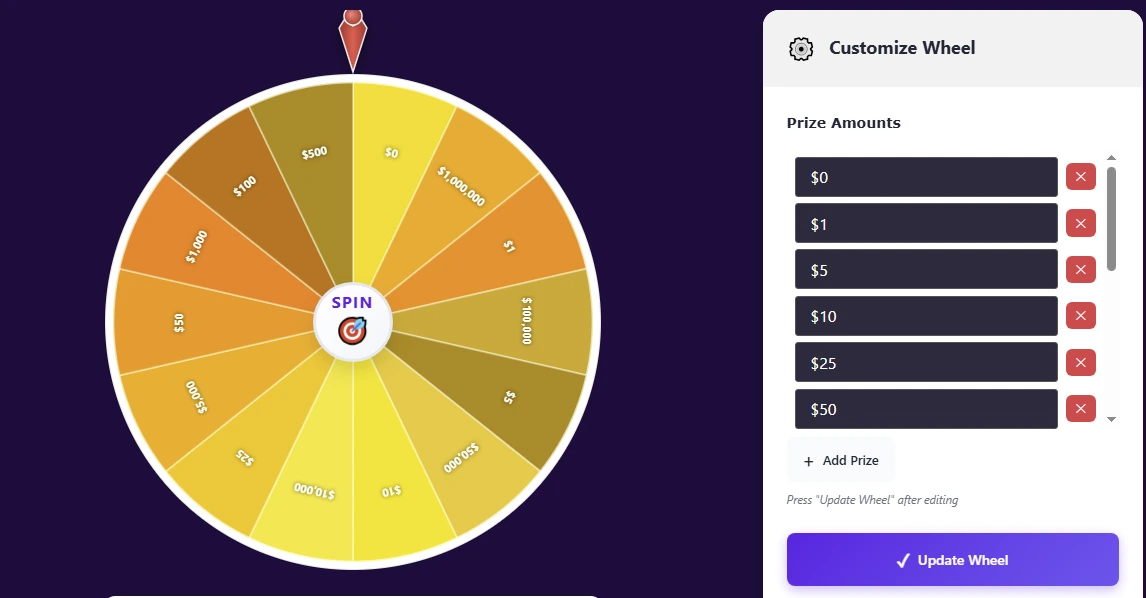
The Spin Numbers “How Rich Am I” wheel tool offers a complete virtual wheel experience. You can customize prize amounts, choose from different color themes, toggle sound effects, adjust spin speed, randomize the order of prizes, reset the wheel, and update your changes instantly. It is designed to be fun, engaging, and easy to use.

👉 Try the Spin Numbers Virtual Wheel Game here and experience the thrill of spinning online.
Why People Love Spinning Wheels
The appeal of a spinning wheel goes beyond simple randomness. There is something deeply satisfying about the visual and auditory experience. The anticipation builds as the wheel slows down. The moment it stops feels like a small celebration. This combination of chance, suspense, and reward makes spinning wheels universally enjoyable.
Virtual wheels add convenience to this experience. You can spin from anywhere, on any device. You do not need to set up a physical wheel or worry about it tipping over. You can customize the wheel for any occasion. And you can spin as many times as you want without any physical effort.
How a Virtual Wheel Game Works
Understanding the mechanics behind a virtual wheel helps you appreciate its fairness and reliability. When you click the spin button, the wheel’s random number generator determines where the wheel will stop. The wheel then rotates, gradually slowing down until it lands on the selected segment.
Most virtual wheels allow you to customize the segments. You can change the prizes or labels, adjust colors, and modify the spin behavior. The wheel then visually displays the updated segments so you can see exactly what you might land on.
Advanced features like randomize shuffle the order of segments before each spin, adding an extra layer of unpredictability. Spin speed controls let you choose between slow, normal, or fast rotations. Sound effects add to the excitement, with clicking and stopping sounds that mimic a real wheel.
The Spin Numbers wheel tool includes all these features. You can add custom prizes, choose from different color themes like Gold Luxury, toggle sound on or off, adjust spin speed, and randomize the prize order. A reset option clears recent spins and returns the wheel to default settings. An update wheel button applies your changes so you can see your customizations immediately.
Step-by-Step Guide: How to Use a Virtual Wheel Game
Using a virtual wheel is straightforward, but following these steps ensures you get the most out of the experience.
Step 1: Decide What You Want to Use the Wheel For
Before you start, think about your purpose. Are you using the wheel for a game with friends? Do you need to make a decision? Are you running a prize giveaway? Knowing your purpose helps you set up the wheel appropriately.
Step 2: Customize the Prizes or Options
Most virtual wheels allow you to add, remove, or edit segments. In the Spin Numbers wheel, you start with default prizes like $0, $1, $5, $10, $25, and $50. You can click “Add Prize” to include your own fictional amounts or any labels you like. You can enter numbers, words, or short phrases. The wheel will update to show your custom segments.
Step 3: Choose Your Visual Theme
Select a color theme that matches your mood or event. The Gold Luxury theme is the default, offering a classic elegant look. You can switch to other themes for a different feel. The visual design adds to the excitement and makes the experience more engaging.
Step 4: Adjust Spin Speed
Decide how fast you want the wheel to spin. Slow speed builds suspense and drama, making each spin feel like an event. Normal speed offers a balanced experience. Fast speed gives quick results, perfect for when you want to move through many spins rapidly.
Step 5: Set Sound Preferences
Toggle sound effects on or off depending on your environment. Sound adds to the excitement, with clicking sounds as the wheel turns and a satisfying stop at the end. If you are in a quiet space or prefer silence, you can turn sound off.
Step 6: Spin the Wheel
Click the spin button and watch the wheel rotate. The wheel will slow down and stop on a segment. The result is displayed clearly. For extra excitement, you can use the randomize button before spinning to shuffle the order of prizes, ensuring each spin feels fresh.
Step 7: Track Your Results
Many virtual wheels keep a list of recent spins. This helps you see patterns and track outcomes. If you want to start fresh, use the reset button to clear the recent spins list and return the wheel to default settings.
Real-Life Examples: Using a Virtual Wheel Game
Virtual wheels are surprisingly versatile. Here are real world scenarios where they add fun and functionality.
Example 1: Family Game Night Prize Wheel
The Martinez family uses a virtual wheel for their weekly game night. They customize the wheel with small prizes like “Choose the Movie,” “Skip Chores,” “Extra Dessert,” and “Family Hug.” Each family member takes turns spinning. The wheel adds an element of surprise and makes game night more exciting.
Example 2: Classroom Reward System
A fifth grade teacher uses a virtual wheel as a reward system. Students earn spins for good behavior or completed assignments. The wheel is customized with rewards like “Extra Recess,” “Sticker,” “Homework Pass,” and “Class Helper.” The visual spinning and sound effects keep students engaged and motivated.
Example 3: Team Building Activity at Work
A company organizes a virtual team building session. They use a wheel customized with fun activities like “Tell a Joke,” “Share a Fun Fact,” “Do a Dance,” and “Compliment a Colleague.” Each team member spins the wheel and performs the activity. It breaks the ice and creates a relaxed, enjoyable atmosphere.
Example 4: Decision Making for a Group
A group of friends cannot decide what to do for the evening. They list options like “Movie Night,” “Board Games,” “Go Out to Eat,” and “Stay In and Cook.” They add these options to the virtual wheel and spin. The wheel decides for them, removing any arguments or indecision.
Example 5: Virtual Party Game
During a remote birthday celebration, the host shares a virtual wheel on screen. Guests take turns calling out “spin.” The wheel is customized with fun challenges and conversation starters. It keeps the party lively and gives everyone something to participate in.
Using a Virtual Wheel for Decision Making
One of the most practical uses of a virtual wheel is decision making. When you face a choice between several options and cannot decide, a spin can provide the answer.
How to Set Up a Decision Wheel
List the options you are deciding between. These could be restaurants, activities, movies, or anything else. Add each option as a segment on the wheel. If you have more than six options, you may need a wheel that supports more segments. The Spin Numbers wheel allows you to add custom prizes, so you can include as many options as you need.
Removing Bias from Decisions
Sometimes you have two equally appealing choices and you cannot pick. A spin removes personal bias. The wheel decides, and you accept the result. Interestingly, many people find that when they spin, they secretly hope for a particular outcome. That hope reveals their true preference even before the wheel stops.
Group Decisions Made Easy
When a group cannot agree, a virtual wheel provides a fair and transparent solution. Everyone sees the spin, and no one can claim favoritism. This works for choosing activities, assigning tasks, or resolving minor disagreements.
Customizing Your Virtual Wheel for Maximum Fun
The ability to customize the wheel is what makes virtual wheels so versatile. Here are some creative ways to use customization features.
Theme Based Wheels
Match the wheel’s appearance to your event. For a birthday party, choose bright festive colors. For a formal event, choose an elegant theme. For a children’s game, choose playful bright colors. The visual theme sets the mood before anyone even spins.
Prize Categories
Instead of monetary amounts, you can use the wheel for categories. For a trivia game, the wheel could have categories like “History,” “Science,” “Sports,” and “Pop Culture.” Players spin to determine their question category.
Challenge Wheels
Create a wheel of dares or challenges for a party. Add segments like “Sing a Song,” “Tell a Joke,” “Do a Funny Dance,” and “Share a Secret.” Players spin and perform the challenge. This is a great alternative to traditional party games.
Countdown Wheels
For a game where players need to achieve a certain score, you can use the wheel to determine point values. Customize the segments with different point amounts. Players spin to see how many points they earn.
Common Mistakes When Using Virtual Wheels
Even with a simple tool, there are ways to use it incorrectly. Here are common mistakes and how to avoid them.
Mistake 1: Not Testing Customizations Before Play
After adding custom prizes or changing settings, always test the wheel with a spin to ensure everything works correctly. A quick test prevents surprises during your actual game.
Mistake 2: Using Too Many Segments
While you can add many segments, too many can make the wheel visually cluttered and difficult to read. Aim for a balanced number that fits comfortably on the screen.
Mistake 3: Ignoring Spin Speed Settings
Different situations call for different spin speeds. A slow spin builds anticipation for a big prize. A fast spin is better for quick decisions. Choose the speed that matches your purpose.
Mistake 4: Forgetting to Randomize
If you spin multiple times in a row without randomizing, the order of prizes stays the same. Use the randomize button to shuffle the order and keep each spin fresh and unpredictable.
Best Practices for Virtual Wheel Games
Follow these best practices to ensure your virtual wheel experience is enjoyable and fair.
Establish Clear Rules Before Spinning
Before anyone spins, make sure everyone understands what the wheel is for and what the results mean. If there are consequences or prizes, clarify them upfront.
Use Sound for Enhanced Experience
Sound effects add significantly to the excitement of a spin. The clicking as the wheel turns and the final stop sound create anticipation and satisfaction. If your environment allows, keep sound on for the full experience.
Keep the Wheel Visible to Everyone
If you are using the wheel for a group, make sure everyone can see the screen clearly. For remote groups, share your screen so everyone can watch the spin.
Reset Between Rounds
If you are playing multiple rounds or sessions, use the reset button to clear recent spins and start fresh. This keeps the experience clean and avoids confusion.
Security and Privacy Considerations
When using an online virtual wheel, privacy is straightforward but worth noting.
No Personal Data Required
A good virtual wheel tool does not require personal information. You do not need to sign up, create an account, or provide an email address. The Spin Numbers wheel works instantly without any data collection.
Use HTTPS for Secure Connections
Look for the padlock icon in your browser when using any online tool. This ensures your connection is secure, even though virtual wheels do not typically handle sensitive information.
Local Processing for Privacy
Reputable virtual wheels process spins locally in your browser. No data is sent to servers where it could be intercepted or stored. Your customizations and spins remain private.
Advanced Features for Power Users
Once you are comfortable with basic wheel spinning, explore these advanced features to enhance your experience.
Randomize Before Every Spin
For maximum unpredictability, use the randomize button before each spin. This shuffles the order of prizes, ensuring that even repeated spins feel fresh and fair.
Adjust Speed Based on Mood
Slow spins are perfect for building suspense when the stakes feel high. Fast spins are ideal for quick decisions or when you want to keep the game moving. Switch speeds to match the energy of your group.
Track Spins for Patterns
Use the recent spins list to see what outcomes have occurred. This can be fun for groups who want to see if someone is “lucky” or to add commentary to the game.
Combine with Other Games
A virtual wheel can be a component of a larger game. Use it to determine starting player, randomize events, or award points. The wheel adds an element of chance that complements many game mechanics.
FAQs About Virtual Wheel Games
1. Are virtual wheel games truly random?
Yes, reputable virtual wheels use random number generators designed to produce unpredictable results. The Spin Numbers wheel uses standard randomization techniques that ensure each spin is independent and each segment has an equal probability of being selected.
2. Can I use a virtual wheel for serious decision making?
Absolutely. Many people use virtual wheels to make decisions when options are evenly balanced. The randomness removes bias and helps you move forward without overthinking. For major life decisions, use the wheel as one input alongside careful consideration.
3. How many segments can I add to the wheel?
The number of segments depends on the tool. The Spin Numbers wheel allows you to add custom prizes, giving you flexibility to create as many segments as you need while keeping the wheel readable.
4. Can I use a virtual wheel on my phone?
Yes, most virtual wheels work on mobile devices through your phone’s browser. They are designed to be responsive, so buttons are easy to tap and the wheel displays clearly. You can bookmark the tool for quick access during games.
5. Is there a limit to how many times I can spin?
No, you can spin as many times as you want. Virtual wheels do not wear out or have usage limits. You can use them for short games or extended sessions without any restrictions.
6. How do I know the wheel is fair and not biased?
Reputable wheels from trusted sources are designed to be fair. The Spin Numbers wheel uses standard randomization methods. If you have concerns, you can test the wheel by spinning many times and observing the distribution. Over a large number of spins, each segment should appear with roughly equal frequency.
7. Can I use a virtual wheel for classroom activities?
Yes, virtual wheels are excellent for classrooms. Teachers use them for random student selection, reward systems, and interactive games. The visual and auditory elements engage students, and the digital format is easy to display on a screen.
8. What should I do if the wheel is not working?
If you experience issues, try refreshing the page or checking your internet connection. Most issues are temporary. The Spin Numbers wheel is designed to be reliable, but if problems persist, clearing your browser cache or trying a different browser may help.
Conclusion: Spin Your Way to Fun and Decisions
A virtual wheel game is more than just a digital toy. It is a versatile tool that brings excitement to gatherings, simplifies decision making, and adds an element of chance to games and activities. Whether you are hosting a party, running a classroom, or just looking for a fun way to make a choice, a spin wheel online delivers every time.
The Spin Numbers “How Rich Am I” wheel offers a complete experience with customizable prizes, multiple color themes, adjustable spin speed, sound effects, randomize and reset functions, and a simple update mechanism. You can tailor the wheel to any occasion and spin as many times as you like.
Next time you face a decision, plan a game night, or just want a moment of lighthearted fun, remember that a virtual wheel is always ready. No setup, no cleanup, no waiting. Just click, watch, and enjoy the thrill of the spin. The outcome is always a surprise, and the experience is always enjoyable.